


This summer, Church360° Ledger introduces Bank Account Integration—a new way to bring your financial activity directly into your workflow.
Instead of starting from scratch, your transactions now flow in automatically—giving you a head start on accurate, up-to-date records while still maintaining full control over how they’re recorded.
Bank Integration: Start Transactions Automatically
Bring Your Bank Activity into Church360° Ledger
With Bank Account Integration, your financial institution securely sends transaction data directly into Church360° Ledger.
Once connected, you can:
-
Import transactions automatically from your bank or credit card accounts
-
Start from real transaction data instead of manual entry
-
View incoming activity in your Ledger workflow right away
-
Maintain control by reviewing and completing every transaction
This integration helps reduce manual data entry while keeping your financial records accurate and complete.
Connect and Map Your Accounts
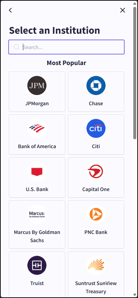 Setting up the integration is simple and secure for Ledger Administrators.
During setup, you will:
- Select your financial institution
- Log in through a secure connection
-
Link each bank account to the correct account in your Chart of Accounts
Mapping accounts correctly ensures that incoming transactions are routed to the right place, making them easier to review and complete.
Plan Ahead for Clean Data
Before connecting your accounts, a little preparation can help ensure a smooth experience.
Here are some things to keep in mind:
Make sure your Chart of Accounts is complete, including income and expense categories you’ll need.
Be aware of other sources of automatic transactions, such as:
- Payroll integrations (like Paycor)
- Online giving (like Vanco)
- Recurring transactions
- Offering batch deposits
These may create duplicate entries in your Pending Transactions list, so it’s helpful to decide ahead of time how you’ll manage them.
Processing Transactions: Review and Finalize with Confidence
Work from Pending Transactions
After setup, transactions automatically appear as Pending Transactions in the Todo list on your Ledger Overview page.
Each transaction includes:
- Account (bank or credit card)
- Transaction date
- Amount
-
Memo provided by your bank
These entries act as a starting point—you’ll review and complete them before they’re officially recorded.
Complete Transactions Accurately
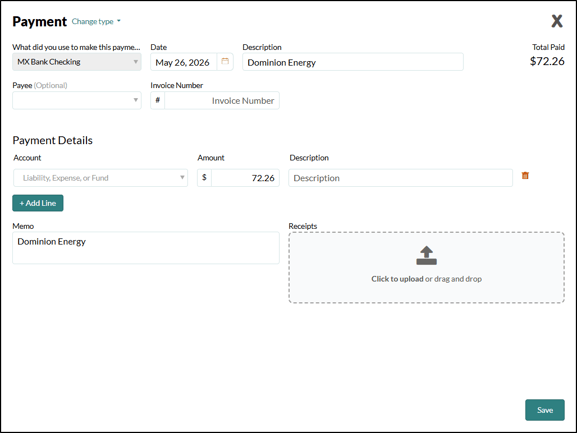
Because banks only provide one side of each transaction, you’ll finalize the details in Church360° Ledger.
To complete a transaction, you will:
- Confirm or update the transaction type
- Add the payee and details, when needed
- Select the appropriate offset account(s)
-
Save the transaction to record it in your books
This ensures your records follow double-entry accounting principles and accurately reflect your income and expenses.
Adjust Transaction Types as Needed
Bank data identifies whether money is going in or out—but Ledger gives you flexibility to classify it correctly.
You can update transactions to reflect common scenarios, such as:
- Changing a Deposit to a transfer or journal entry
-
Changing a Payment to a check, payroll transaction, or transfer
Credit card transactions can also be handled appropriately, whether you’re recording purchases or paying down a balance.
Manage Duplicates Carefully
If you use multiple integrations or recurring entries, you may see duplicate transactions in your Pending list.
When reviewing:
- Decide which transaction to keep and complete
-
Dismiss duplicates you don’t need
Keep in mind that dismissed transactions cannot be recovered, so review carefully before removing anything.
Stay Current with Regular Review
Regularly reviewing your Pending Transactions helps keep your books clean and up to date.
As a best practice:
- Check transactions frequently
- Use imported memo details to guide categorization
- Verify account selections to ensure reporting accuracy
This consistent review process helps maintain reliable financial records over time.
Simplify Your Financial Workflow
With Bank Account Integration, Church360° Ledger helps streamline one of the most time-consuming parts of financial management.
By bringing transaction data directly into Ledger—and combining it with flexible tools to review and complete entries—you can spend less time on manual entry and more time ensuring accuracy and clarity.
To learn more about bank integration, visit the Church360° Ledger Help Center.